

Are you on a hunt for Originality ai free trial? Want to try one of the best (if not the best) AI content detectors in the market? Then you’ve just arrived at the right place at the right time.
There’s good news and bad news;
The good news:
OriginalityAI does not directly offer a free trial but they have a free version where you can instantly paste or upload your copy to detect for AI . As seen below;
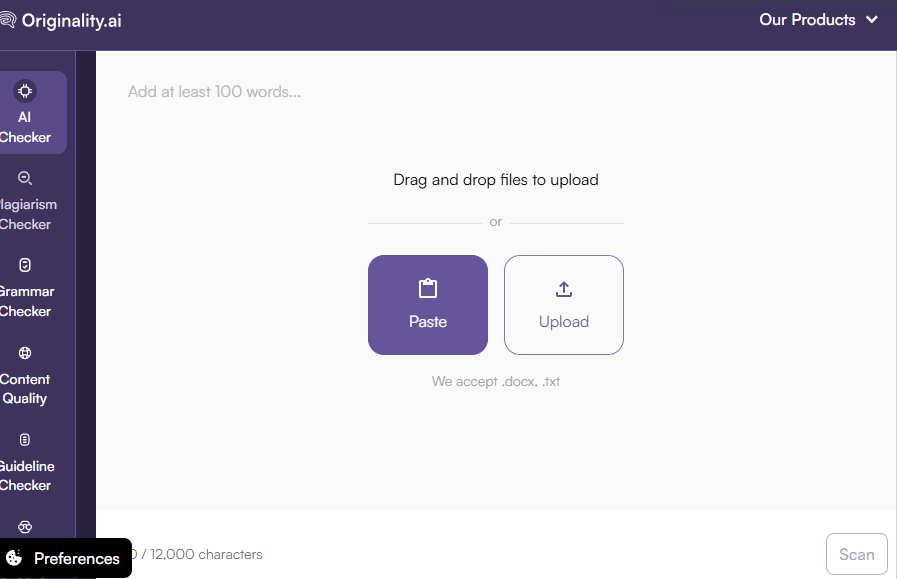
You wouldn’t even need to signup to use this.
The bad news:
You won’t be able to check a lot of content for AI and plagiarism because you get only limited scans. If you need to check more then you have to sign up and upgrade to paid version.
However it will help you decide if the tool is worth paying for.
Are you fine with getting limited content scans for testing purpose? If yes, then let’s go ahead.
So how can you activate the Originality.ai free trial?
It’s easy. Simply head over to the website, or use the button link below;
Quick note: We get a small commission when you buy OriginalityAI through our affiliate link at no additional cost to you. Thank you for your support!
Need more details on this free trial account such as it’s limits and other stuff? Then keep reading.
In this article we’ll expand more on;
- How to get started using originality AI for free step-by-step
- Features and benefits of this tool
- Pricing and more
I’ll also do a live AI content checking with examples to confirm its accuracy.
Sounds cool?
Without wasting time let’s jump to it.
How to Activate Originality AI Free Trial in 2026
Nothing to activate really, it’s just there on the website for you to use immediately you arrive but let me guide you nevertheless.
Follow the below step by step instructions to test originality ai for free and start detecting AI generated content immediately.
Step 1: Visit this special link and it will take you directly to the OriginalityAI website. It looks something like this image below;
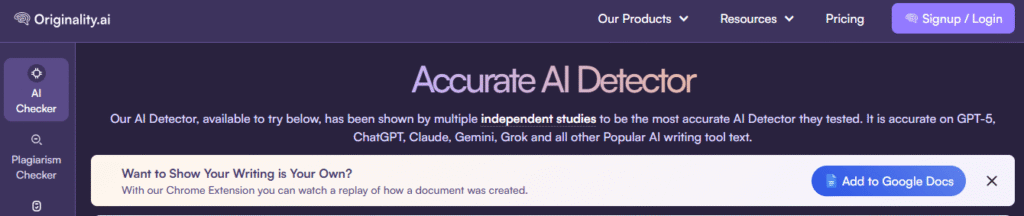
As seen above, immediately you land on the page, there is a box that lets you upload or paste your copy to detect for AI content.
Step 2: This step is quite obvious. Paste your copy in the box and click the scan button. It will go ahead and scan it . As seen below:
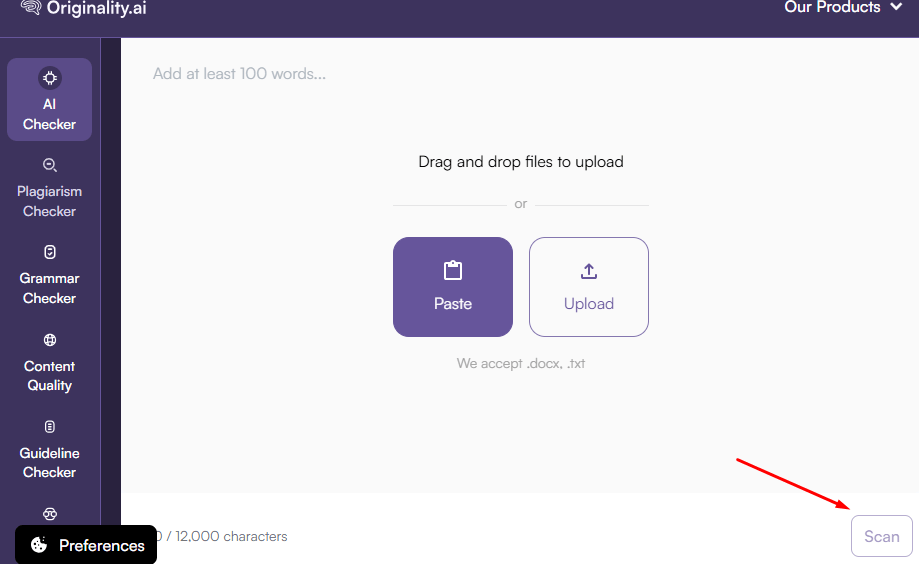
Just choose the model, or leave it at default and select your language, hit scan.
Easy! Peasy!.
When it’s done scanning you’ll get your result whether the text is AI generated or not, along with the score.
For example as seen below is a copy of 100 words I generated using Google AI and scanned myself and the result from Originality.ai;
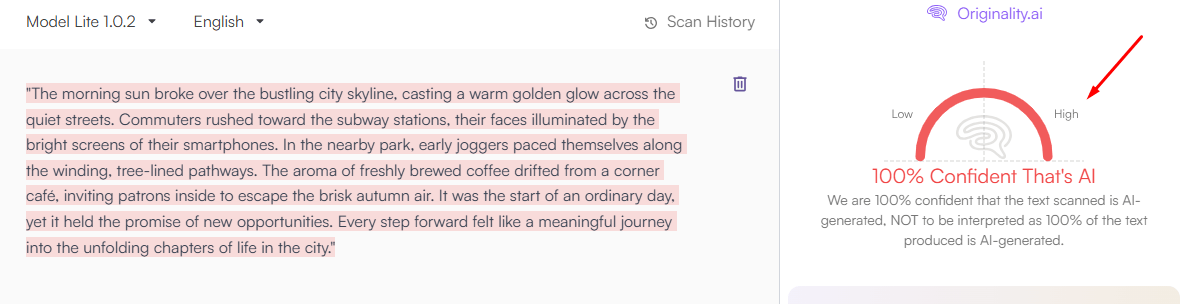
The result? 100% confidence it was generated using AI.
The accuracy level is very good from numerous testing I’ve done.
So what are you still waiting for? Click the button link below to try Originality.ai free trial
Limits of the Originality AI trial Account
Since this is free version of the tool there are many things you can’t do and they include the following:
- You can’t check content for plagiarism: This free version only allows you check for AI content
- No full website scanning: You will not be able to scan a full website for AI content and plagiarism. This is a feature that helps if you are looking to scan a website to detect if the content was written using AI writing tools.
- You can’t add team members
- No core features such as fact checking, readability check, content quality and much more.
If you want to get full access to all the features, then you have to sign up and upgrade to a paid plan.
Features of Originality Checker
What features and benefits come with this powerful AI detector? Let’s check and explain everything for you to understand better.
Originality.ai provides important tools for successfully detecting content written by AI writing assistants such as ChatGPT, JasperAI, Writecream, etc.
They include the following;
1. AI Content Scan
This section allows you to paste content from any place or upload your document in Docs. It also gives you the option to scan only for AI or for Plagiarism or both
To use this is easy.
- Copy the content, could be a blog post or an essay, etc.;
- Paste in the content scanner box.
- Select if you want to scan for AI and Plagiarism or only AI
- Hit “Scan now” button.
In seconds, it will return the results.
You’ll see a percentage of how much content is AI and original.
If the content was copied, Originality.ai will display the page URL for you too.
2. Full Website Scan
Just as the name sounds, you can scan a whole website for AI and Plagiarism. You can scan up to 1,000 pages on the website.
This one uses a lot of credit.
It helps if you buy websites and want to confirm if the posts were written using an article generator.
3. AI Plagiarism Checker
This is another very important feature by the Originality AI team. After scanning your content and determining the amount of AI content you can also check for plagiarism.
This is very helpful to know if the article has been written elsewhere on the internet and so it helps you avoid duplicate content that harms your SEO rankings.
After scanning your content for plagiarism if there is any, it will deliver a detailed reporting with the URLS, quotes, etc. where it was plagiarized.
Super helpful too for bloggers who prioritize SEO. We all know duplicate content doesn’t rank.
4. AI Fact Checking
Included with AI checking and plagiarism, OriginalityAI also has a fact checker.
Let’s be real, it’s the age of artificial intelligence and many AI writing tools could create content and add statements or quotes that aren’t true. This leads to misinformation and definitely loss of credibility.
This is why the OriginalityAI fact checker tool is handy.
It fact checks your content real time and ensures everything is correct.
5. Readability Checker
This is another key feature from Originality.ai
With this, you are guaranteed content that is clear and “READABLE” to your audience.
When your content is clear, you can expect better engagement.
It’s a nice tool to have in your content creation arsenal.
6. Chrome Extension
One of the main reasons why chrome extensions exist is to make life easier for people. OriginalityAI has made sure AI content is easy and fast by creating a chrome extension.
At the click of a button you can now detect AI content.
Other important features include the following;
- Content quality score
- Guideline checker
- Grammar checker: This is very important to avoid spelling errors/typos
- Deep scan: AI + AI education all-in-one
- Bulk scan
As you can see originality is a complete suite of AI detection.
Originality AI Pricing
Originality AI comes with three pricing plans and they include:
- Pay as you go
- Pro
- Enterprise
Let me expand on these plans so you can know which one to choose when buying a subscription.
1. Pay As You Go Plan
The first pricing plan from Originality AI which costs a $30 one-time price and gives you access to the following things:
- 3,000 credits (1 credit scans 100 words for AI checking and plagiarism and 10 words for fact checking) (2 years expiry)
- AI checker
- Plagiarism checker
- Readability checker
- Grammar & Spelling Checker
- Fact Checking Aid
- Deep Scan
- SEO Content Optimizer
- Word Press Plugin
- 30-day scan history
- Shareable reports
- Standard support
This 3,000 credits expire in 2 years.
This is a good plan because it’s one-time but you won’t get to enjoy the complete features offered by Originality.ai
2. Pro Plan
Pro plan costs $14.95 per month ($12.45/mo when paid yearly)
It gives you access to everything in pay as you go along with the following things:
- 2,000 credits monthly
- 1 month expiry – renews monthly
- 1 credit =100 words
- Standard support
- File upload (docx, pdf, doc)
- Full site scans
- Simply enter the URL of any website to scan
- Team management
- Tag scans
- Access to future features
- Chrome extension
- Additional team seats – $8.62 per month
This is the perfect plan if you plan to take AI content detection to the next level. It is what I recommend because you can get access to everything you need
3. Enterprise Plan
This is the most expensive plan from Originality AI and it costs $179 per month ($136.58/mo when paid yearly).
It gives you access to everything in pro plan and additional things below:
- 15,000 credits monthly (1 month expiry- renews monthly)
- 1 credit = 100 words
- Dedicated customer success manager
- Priority support
- 365 days scan history
- API access
- Additional seats – $19.04 per month
Why Use Originality.ai for AI Content Detection in 2026?
What are the benefits when you actually use Originality AI checker tool?
Here are the top benefits.
1. Produce Original Content
If you are looking to create only original content then it helps to have an AI content detector such as Originality.ai
It not only checks for AI content but also has a plagiarism tool that detects if content was copied or not.
With this you’re sure all the content you’re publishing is free from plagiarism and written by a human.
2. Save Money
Until now, businesses have been wasting a lot of money hiring writers.
The problem is that most of these writers do not actually deliver what you paid for. They go ahead to use AI writing tools and come up with garbage content that may never rank on Google or get hit by an update later.
In the end you end up only wasting your money.
With OriginalityAI you can now save money and find out if content was written using an AI tool.
When you discover this, you can terminate your contract with that writer and save yourself the stress and future damage.
3. Team function for unlimited content
OriginalityAI comes with a feature that allows you add unlimited team members to help with AI content detection.
Now you can create content on a large scale while you work on other important aspects of your business.
Invite members and they will be able to check content for plagiarism and AI
You definitely save a lot of time.
FAQs on Originality AI Free Account
Here are frequently asked questions around the Originality AI content detector tool free account. I’ve answered everything in full detail and hope it helps you understand more.
Can I use Originality AI for free?
Yes, you can use Originality AI completely free. All you have to do is go to the Originality.ai website and paste your copy and click the scan button. Free scan is limited so you have to sign up and upgrade for more scans.
Do you have to pay for originality AI?
No, not necessarily. You can scan content for free on the website using the free version however it is limited. So if you want to scan more words you will have to pay.
Is originality AI worth the money?
Yes, definitely worth the money if you consider its features such as AI checker, readability scan, AI seo, and much more. These features make it one of the best if not the best AI detector in the industry. However its pricing may be an overkill for students and individual writers.
Which is better, Turnitin or Originality AI?
Turnitin is designed for Universities and schools that need mostly plagiarism checking while Originality AI is designed for publishers and agencies. So which is better depends on your personal needs.
Conclusion on Originality.ai Trial Account
Let’s be honest with ourselves. There is nothing absolutely wrong with using AI writing tools for content creation however there should be a limit.
“Everybody wants to create content with AI but no one wants to read them”
AI content writing tools should only serve as assistants not necessarily replace us.
This is why AI detectors like OriginalityAI are on the rise.
If you want to try the tool for free before committing to a paid plan you’ve arrived at the right place.
Go ahead, try the tool and if you like it you can purchase some credits.
Are you going to activate the Originality.ai free trial right away? Do you have any questions? Please let me know in the comment section.

Hello there, I’m Prosper Noah, a blogger turned full fledged data-driven digital marketer with more than 8 years in the content marketing game. My team and I will help you drive more traffic and skyrocket your sales
very informative articles or reviews at this time.