Are you on a hunt for a Synthesia free trial? Want to try this amazing AI video generator for free before upgrading to a paid plan? Then the Synthesia free plan is what you need.
No worries, you’re definitely in the right place at the right time.
We’ll share details about how to claim the trial, its features, limits, pricing and much more.
Before then, let’s quickly clear the air.
Is a free trial available on Synthesia IO?
No, but Synthesia has a free Basic plan that lets you try their AI video generator completely free. You get 10 minutes of video and 500 credits every month, with no credit card needed.
First, you can instantly create a free demo video with an AI avatar just by typing a short script, and they send it to your email. No signup required.
Then you can also sign up for a free account to try the video editor, templates, avatars, AI voices and more.
You can use the following button link to get started with Synthesia AI free of charge.
Quick note: I get a small commission when you buy a Synthesia subscription through my link at no additional cost to you. Thank you so much for your support!
Need more details on how to activate this and generate your free video? Then keep reading.
In this article we are going to cover:
- What Synthesia AI is all about
- How to create a free Synthesia AI video
- How to sign up for the Synthesia free plan
- Free plan limits, pricing plans and much more
Let’s jump to it right away.
What is Synthesia.io?
Synthesia is an AI video generator that lets you turn text into high-quality videos with AI avatars and voiceovers. You type your script, pick an avatar, and Synthesia creates a video of the avatar presenting it.
You can create videos with AI voiceovers and avatars in more than 140 languages, and Synthesia says over 2 million users and 90% of Fortune 100 companies use it.
It’s a perfect fit for video marketers, course creators, training teams, YouTube channels and customer support.
So let’s take a look at how to get started with Synthesia for free.
Step-by-Step Guide to Create a Free Synthesia AI Video
If you want to generate a free video from text using Synthesia AI, it’s very easy. Just follow the step-by-step tutorial below and you should be up and running as soon as possible.
Step 1: Visit this special link and it will take you straight to the Synthesia website. Here’s how the page looks like;
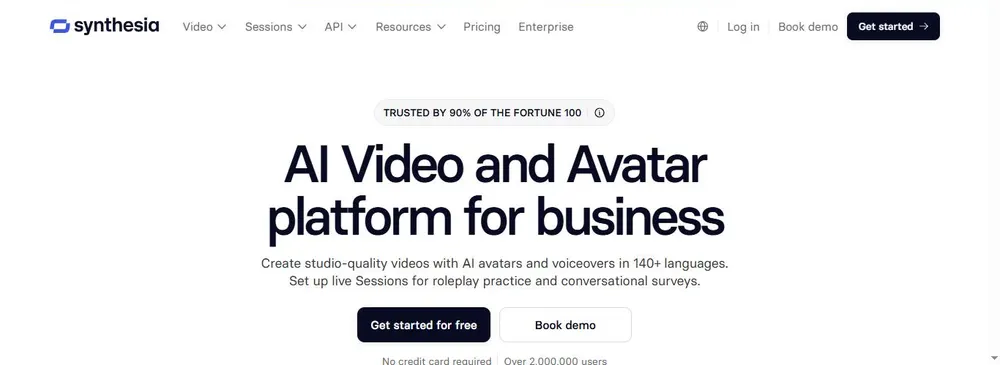
Step 2: Scroll down a little to the free video section. Select one of the AI avatars and type your script in any language (it has a short character limit).
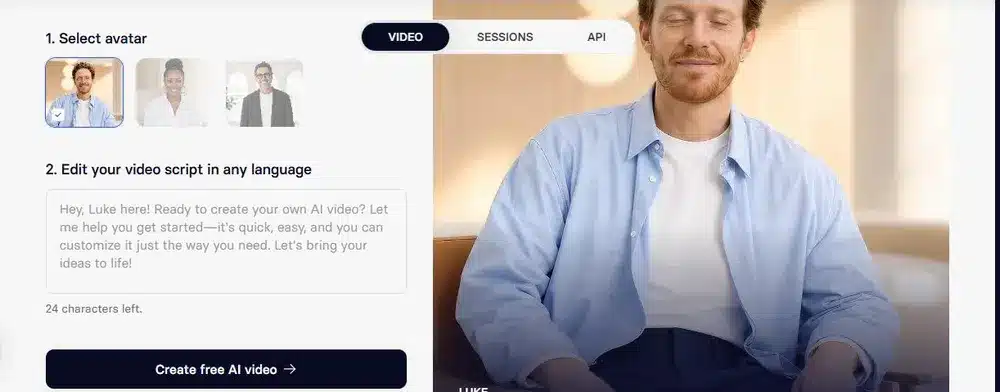
Step 3: Click the “Create free AI video” button.
Step 4: Now you need to fill in your details such as first name, last name and work email. This is where Synthesia will send your free video. Here’s how the page looks like;
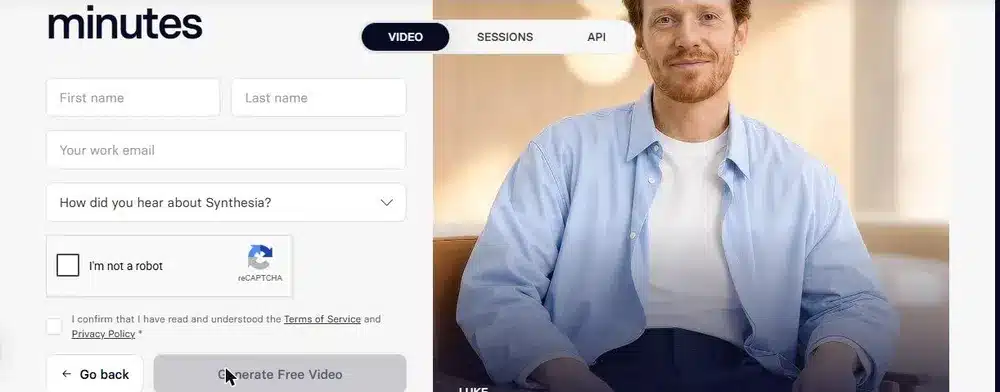
When done, tick the boxes and simply click “Generate Free Video”, and Synthesia will send it to your email in minutes. Just like this one:
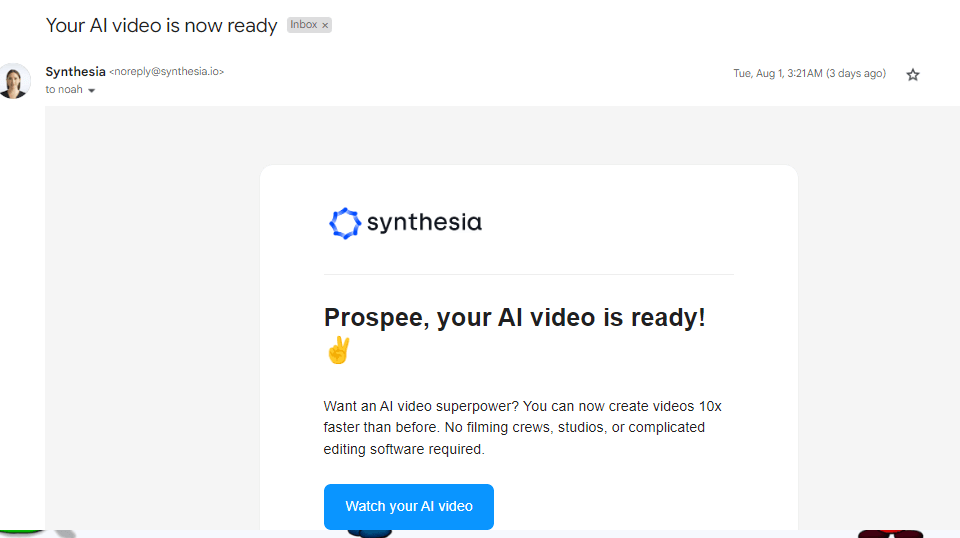
Now you can watch your newly AI generated video and see exactly how it looks like.
Easy peasy!
This is exactly how to test the Synthesia.io AI video maker for free.
So what are you still waiting for? Use the following link to try it.
How to Sign Up for a Synthesia Free Account
The demo video is just a quick test. If you want to create and edit your own AI videos, you need to sign up for the free Basic plan. Follow the step-by-step instructions below to get started.
Step 1: Visit this special link and it will take you to the Synthesia website. This time, click on Pricing at the top of the page.
Here is how it looks like in the screenshot below;
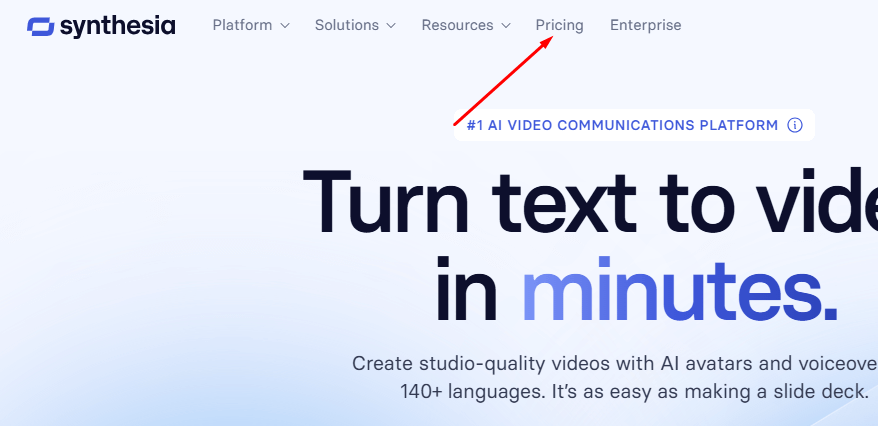
Step 2: Immediately you click on Pricing, it takes you straight to the pricing page of Synthesia. There you can select the free Basic plan and click “Get started”.
As seen in this screenshot below;
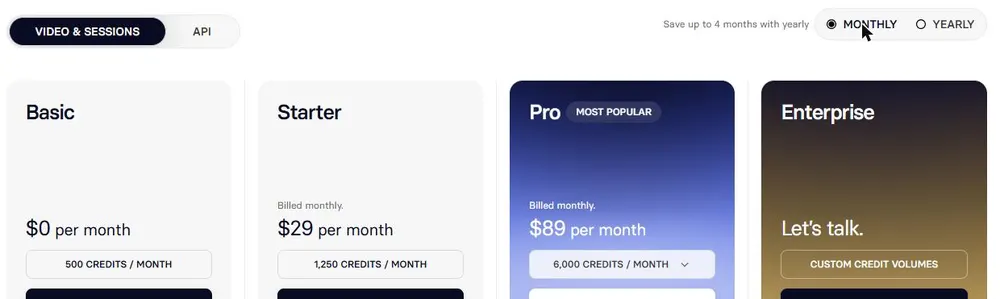
Step 3: After clicking “Get started”, you’ll be taken to another page where you have to sign up.
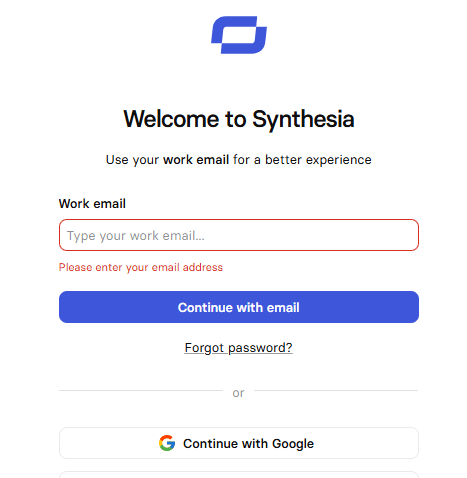
Step 4: Enter your email and hit “Continue with email”. Alternatively, you can continue with Google if you have your Gmail logged in already. The process is much faster.
Step 5: When you’ve entered your email, you’ll be redirected to the signup page to enter your account details and password.
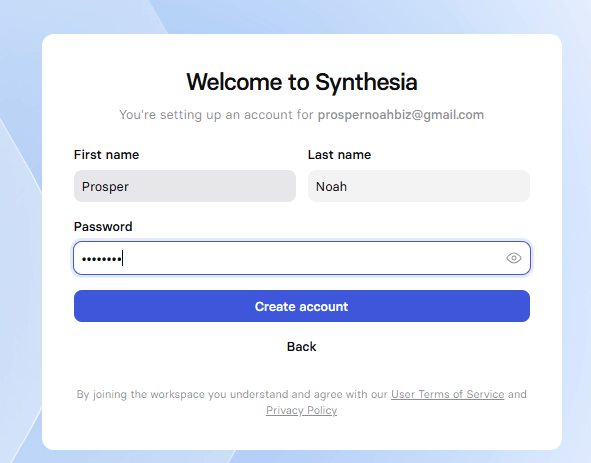
Step 6: Hit “Create account”, and on the next page you have to enter the verification code sent to your email for confirmation.
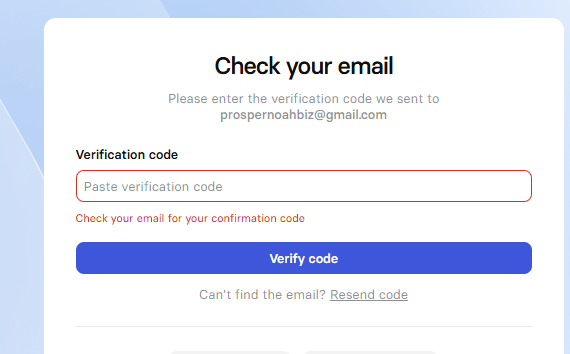
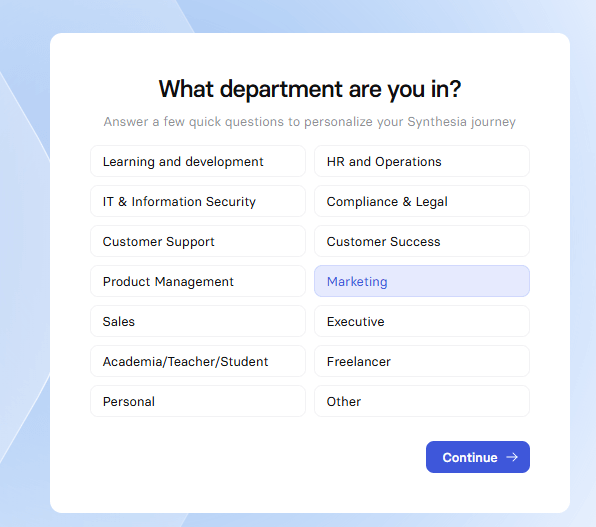
Step 7: When you’ve entered the code, you just need to answer a few questions about your industry and you should be in ASAP.
Step 8: Start creating your videos. Now you just need to select the type of video you want to create and get to it.
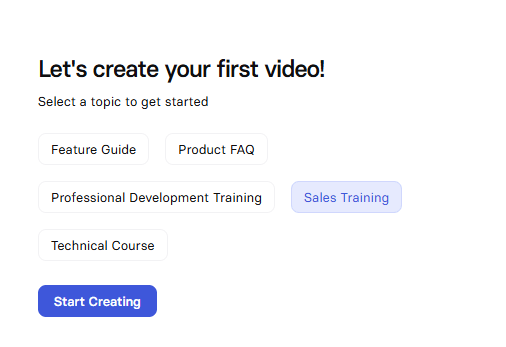
That’s just it. Many steps but very easy and simple once you’re finally in your dashboard. Next time, just use the Log in button on synthesia.io with the same email.
So what are you still waiting for? Use the link below to get started with the free account.
Synthesia Free Plan Features and Limits
Here’s what you get with the free Synthesia Basic plan:
- 1 editor seat
- 10 minutes of video per month (resets every month)
- 500 credits per month
- 9 AI avatars
- 140+ languages and voices
- 60+ templates
- Share your videos online with a share link
- Support via AI chat
And here are the limits:
- Videos carry a Synthesia watermark
- You can’t download your videos as MP4 (sharing by link only)
- No personal avatars (those start on Starter)
- Unused minutes don’t roll over to the next month
If you only watch the free demo video sent to your email, you can’t edit it. To create and edit multiple AI videos, sign up for the free plan as shown above.
Why Choose Synthesia IO for AI Video Generation in 2026?
What are the top benefits that come with this excellent AI video generator? Let’s take a look at some mind-blowing ones.
Create video in multiple languages
This is one of the top benefits of Synthesia. You can create videos in over 140 languages to communicate with your audience, instead of spending thousands of dollars to hire video creators and translators.
Video production at scale
You don’t need to record, translate and edit any longer. Synthesia does it for you automatically, and all you need is a text and a template. You can use any voice and avatar of your choice. This helps you produce videos at scale, whether for YouTube, training or marketing.
Save money and time on video production
You no longer need to hire expensive studios, actors and narrators, or buy recording equipment. It also saves you a lot of time on editing and re-recording.
What are you still waiting for?
Synthesia Pricing Plans 2026
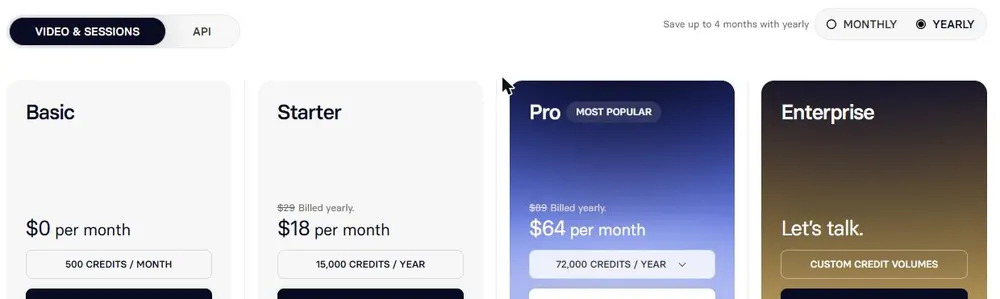
After the free plan, Synthesia offers three paid plans: Starter, Pro and Enterprise. Everything now runs on credits, and a typical minute of video uses about 100 credits.
| Plan | Monthly | Yearly | Credits | Video |
|---|---|---|---|---|
| Basic | $0 | $0 | 500/month | 10 min/month |
| Starter | $29/mo | $18/mo | 1,250/month (15,000/yr) | ~150 extra min/yr |
| Pro | $89/mo | $64/mo | 6,000/month (72,000/yr) | ~720 extra min/yr |
| Enterprise | Custom | Custom | Custom | Unlimited |
Prices as checked on Synthesia’s pricing page on October 20, 2026. The extra minutes on paid plans come on top of the free 10 minutes a month.
Synthesia Starter ($29/month or $18/month yearly): everything in Basic, plus MP4 downloads, no watermark, 125+ AI avatars, 3 personal avatars, the AI video assistant, 3 guests and chat/email support.
Synthesia Pro ($89/month or $64/month yearly): this is the plan that used to be called Synthesia Creator. You get everything in Starter, plus 180+ AI avatars, 5 personal avatars, branded video pages, interactive videos, 5 guests and priority support. It’s the most popular plan.
Synthesia Enterprise (custom pricing): everything in Pro, plus unlimited video minutes, 240+ AI avatars, unlimited personal avatars, 1-click translations into 140+ languages, live team collaboration and a dedicated customer success manager.
If you want the full breakdown, check out my Synthesia pricing guide.
Synthesia Discount: How to Save Money
Looking for a discount on your Synthesia subscription? The easiest way is to pay yearly. Synthesia says you save up to 4 months with yearly billing:
- Starter: $29/month, or $18/month billed yearly
- Pro: $89/month, or $64/month billed yearly
Synthesia also shows limited-time promo credits (2,000 credits) on its plans right now, so check the pricing page before you buy.
How to Make the Most of Your Free Plan
You only get 10 minutes of video per month on the free plan, so make good use of it before deciding whether to upgrade.
- Watch Synthesia’s training videos to learn how to use the software, especially the product tour
- Go through the templates, AI voices and avatars to understand how each of them works
- Test, test, test the output
- Keep your test videos short (1 minute or less) so your minutes last longer
This should help you decide whether to upgrade.
Synthesia Alternatives
Looking for a Synthesia alternative? There are many good AI video generators just like Synthesia. Some of the best include HeyGen, InVideo AI, DeepBrain AI, Colossyan and FlexClip. Most of them have free plans to test as well.
Synthesia however seems to be the most popular, and there is a reason: it’s one of the best in the AI video generator industry.
FAQs on Synthesia Free Trial
Here are some frequently asked questions about the Synthesia IO free plan and free AI video.
Does Synthesia have a free trial?
Not a time-limited free trial. Instead, Synthesia has a free Basic plan that gives you 10 minutes of video and 500 credits every month, with no credit card needed. You can also generate one free demo video from their homepage without signing up.
Is there a free version of Synthesia?
Yes. The Synthesia Basic plan is free forever. It gives you 10 minutes of video per month, 9 AI avatars, 140+ languages and voices, and 60+ templates. Videos carry a Synthesia watermark.
Does Synthesia IO cost money?
The Basic plan is free. Paid plans start at $29 per month for Starter and $89 per month for Pro, or $18 and $64 per month if you pay yearly.
How many videos can you make with Synthesia for free?
On the free plan you get 10 minutes of video per month. For example, that’s ten 1-minute videos or two 5-minute videos.
Can I download Synthesia videos for free?
No. On the free plan you can share your videos online with a share link, but MP4 downloads start on the Starter plan, which also removes the Synthesia watermark.
Where is the Synthesia IO login?
Go to synthesia.io and click Log in at the top right. If you signed up with Google, choose Continue with Google to access your Synthesia login.
Can I use Synthesia online?
Yes. Synthesia works online in your browser, so there’s nothing to install. You just sign up and start creating videos.
What happened to the Synthesia Creator plan?
Synthesia renamed its plans. The old Creator plan is now called Pro, and it still costs $89 per month or $64 per month billed yearly.
What is the best free alternative to Synthesia?
Popular Synthesia free alternatives include HeyGen, InVideo AI, Colossyan and FlexClip. Most of them have free plans or free trials you can test.
Is there any 100% free AI video generator?
Most AI video generators, Synthesia included, give you a free plan with limits. Synthesia’s free plan lets you create 10 minutes of video every month for free, which is enough to test it properly.
Final Thoughts on Synthesia IO Free Plan
It’s no doubt that artificial intelligence is exploding right now, and AI text-to-video generators are one thing to look out for. Synthesia, hands down, is one of the best AI video generator apps in the market.
With the free Basic plan, you get 10 minutes of video every month to test it properly, with no credit card needed.
So what do you think about the Synthesia.io free plan? Will you start using Synthesia to generate AI videos from text? Have any questions? Please let us know in the comments section.

Hello, I’m Prosper Noah, a digital marketer with more than 8 years of experience. My ultimate goal on this website is to use the power of online marketing to help businesses get more visibility and reach more customers.